Clean up your images instantly with the most accurate object removal tool.
No image?Try one of these:
Free AI Magic Eraser Online — One Click, Done in Seconds
Our free ai magic eraser helps you remove objects, text, and watermarks in seconds. Just brush over anything you want gone, whether it is a stranger in the background, a distracting logo, or an old scratch. The tool instantly blends the background to give you a clean and perfect photo.
BeforeAfter
BeforeAfter
Remove Text and Logos from Any Photo
You finally find the perfect image for your project, only to realize an intrusive watermark or timestamp is ruining the shot. Instead of spending hours manually editing pixels, just use our ai magic eraser. It easily wipes away text, dates, and logos, blending the background perfectly—whether you are cleaning up a stock photo or an old family scan.
BeforeAfter
Clean Up Photos With ai magic eraser
Raw product shots are rarely perfect; a tiny spec of dust, an ugly barcode sticker, or an accidental fingerprint on a glossy surface can make your merchandise look cheap to potential buyers. For online business owners looking for a powerful ai photo editor, this feature acts as a digital polishing cloth. It effortlessly vaporizes background clutter and imperfections.
BeforeAfter
Remove Glare and Reflections from Photos
You take a great photo of a city skyline through a cafe window, but the indoor ceiling lights reflect across the glass, ruining the shot. Instead of giving up on the picture, you can use an ai magic eraser to simply wipe the glare away. Just brush over the flash flares, white hazes, or mirror reflections to remove them completely.
BeforeAfter
Remove Tourists and Crowds from Travel Photos
You stand before the majestic Eiffel Tower, but instead of a romantic keepsake, your photo features a chaotic sea of tourists packing the background. Simply paint over the distracting crowds, and watch the AI seamlessly reconstruct the architecture and streets beneath them.
BeforeAfter
Remove Distracting Wires, Cables, and Power Lines
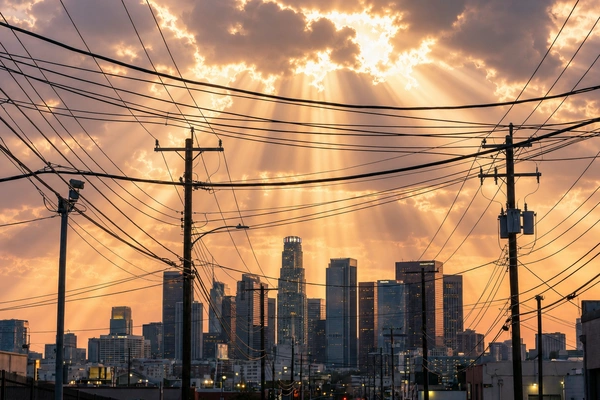
A spectacular pastel sunset over a modern skyline is perfectly framed, except for black telephone lines and power cables cutting through the sky. With a single brush stroke, it wipes the sky clean, knitting clouds and gradients back together without blurred smudges.
BeforeAfter
Fix Group Photos and Remove Photobombers
It is the perfect family reunion portrait, but a random stranger pulls a funny face in the background. Use our tool to rescue the frame. The engine fills the blank void with authentic textures, keeping the focus entirely on your loved ones.
BeforeAfter
Fix Small Skin Blemishes and Temporary Marks
You do not need heavy makeup or complex editing skills to look your best. This feature treats portraits with delicate care, gently lifting away temporary skin imperfections, stray hairs, and minor shadows while preserving natural texture.
BeforeAfter
Make Social Media Photos Clean and On-Brand
A brilliant outfit-of-the-day photo can be undermined by a trash can or ugly parking sign in the background. This tool sweeps away visual static, making your main subject pop and ensuring every square inch feels intentional.
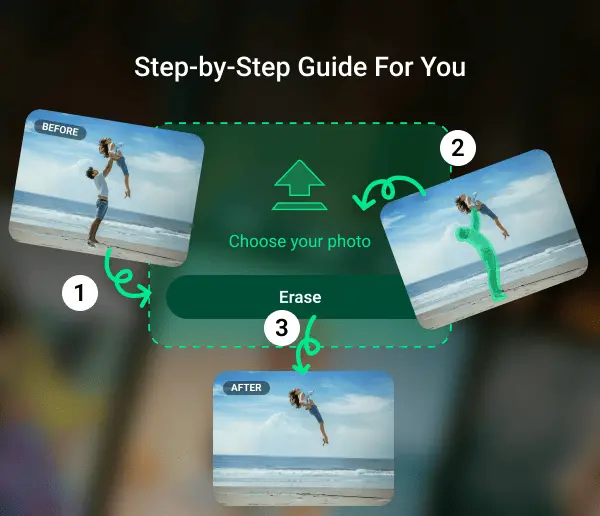
How to Use AI Magic Eraser in 3 Steps
1
Step 1: Upload Your Photo
Drag and drop your image directly into our secure workspace. We support standard formats like JPG, PNG, and WebP, getting you ready to edit in less than a second.
2
Step 2: Brush, Box, or Auto-Select the Object
Adjust the brush size and casually paint over the unwanted element. You do not need to be precise; our smart detection auto-snaps to the object boundaries perfectly.
3
Step 3: AI Process and Download
Click erase and watch the magic happen instantly. Our neural network replaces the object with matching textures, leaving a clean image ready for high-res download.
Why does our AI magic eraser stand out?
More Precise AI Removal Model
Unlike basic tools that leave blurry smudges, our ai magic eraser seamlessly rebuilds the missing background by matching surrounding textures and details for a natural, flawless finish.
Easier, More Intuitive Workspace
Forget about complex Photoshop tools. Just choose what you want to remove, brush or draw a box over it, and let the AI automatically clean it up with zero learning curve.
Try It Free Instantly
Anyone can simply open their browser and use a powerful ai magic eraser to remove objects completely for free, making creative editing easier to start.
Works on Any Device
Edit on the fly. Our responsive cloud infrastructure delivers fast processing inside your mobile, tablet, or desktop browser.
Empowering More Creators with a Free AI Magic Eraser
BeforeAfter
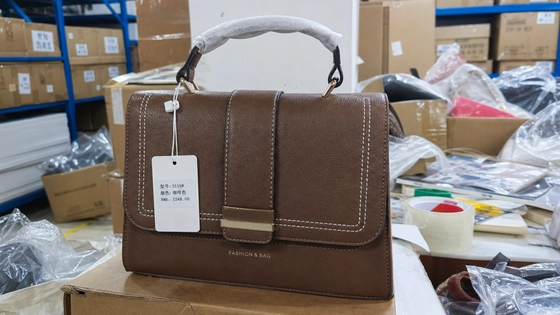
Instantly clean up supplier product images, erase distracting price tags, and remove warehouse background clutter to build professional, high-converting store listings.
What Our Users Say About AI Magic Eraser
Jessica W.E-commerce Entrepreneur
I run a dropshipping store, and the images I get from suppliers always have weird logos or text right in the middle. I used to spend hours cloning them out in Photoshop. This tool just wipes them clean in seconds. Saves me so much time every week.
Liam T.Travel Content Creator
Got an amazing shot in Kyoto, but there was a bright orange trash can and a guy looking right at the camera in the background. I ran it through the ai magic eraser, and they’re completely gone. The street behind them looks totally normal. Exactly what I needed for my feed.
Nina S.Freelance Designer
A client sent me some property photos to edit, but there were messy power lines blocking the sky and date stamps in the corners. I just brushed over them, and it blended the sky back perfectly. No weird blurry patches. Super straightforward.
Jessica W.E-commerce Entrepreneur
I run a dropshipping store, and the images I get from suppliers always have weird logos or text right in the middle. I used to spend hours cloning them out in Photoshop. This tool just wipes them clean in seconds. Saves me so much time every week.
Liam T.Travel Content Creator
Got an amazing shot in Kyoto, but there was a bright orange trash can and a guy looking right at the camera in the background. I ran it through the ai magic eraser, and they’re completely gone. The street behind them looks totally normal. Exactly what I needed for my feed.
Nina S.Freelance Designer
A client sent me some property photos to edit, but there were messy power lines blocking the sky and date stamps in the corners. I just brushed over them, and it blended the sky back perfectly. No weird blurry patches. Super straightforward.
FAQs about AI Magic Eraser
Found the perfect photo but it has unwanted text? Just upload your picture to our workspace. Use the brush to highlight the captions, date stamps, or watermarks you want gone. Our AI instantly removes the words and seamlessly rebuilds the original background behind them in seconds.
Yes, it is designed exactly for that. The tool eliminates visual distractions ranging from random people walking through your shot, harsh ground shadows, window glass reflections, to messy desktop clutter.
Yes, our advanced neural network is trained to understand depth and context. It can differentiate between the foreground object and complex backgrounds like grids, brick walls, or foliage.
Yes, it excels at removing overlaid graphic elements. Simply paint over text, time-stamps, copyright watermarks, or branding logos, and the AI will cleanly erase them while smart-filling the background pattern.
Your privacy is our top priority. Images are not stored after processing and are not used to train AI models.
We support standard web formats including JPG, JPEG, PNG, and WebP. Your edited results are exported in high quality for active projects.
Yes, our AI Magic Eraser is available for free, designed to make your editing process much more convenient.
No, your original photo quality will not be compromised. The AI only modifies the specific pixels you painted over with the brush.
The entire process takes only a matter of seconds. Upload your photo, paint over the unwanted object, and our cloud processors deliver a clean result.
Yes, it is a fully web-based application. It works across modern browsers including Safari, Chrome, and Edge on any operating system.
Absolutely. Our tool processes edits while preserving your original file dimensions and image sharpness.